CLI·MTARSI listed

mTarsier
mtarsier.com
Open-source platform for managing MCP servers and clients
MCP Client CLI
 MCP Hub
Test MCP servers like a real AI client, not just a ping
Free listing links are nofollow. Owners can unlock a permanent dofollow backlink.
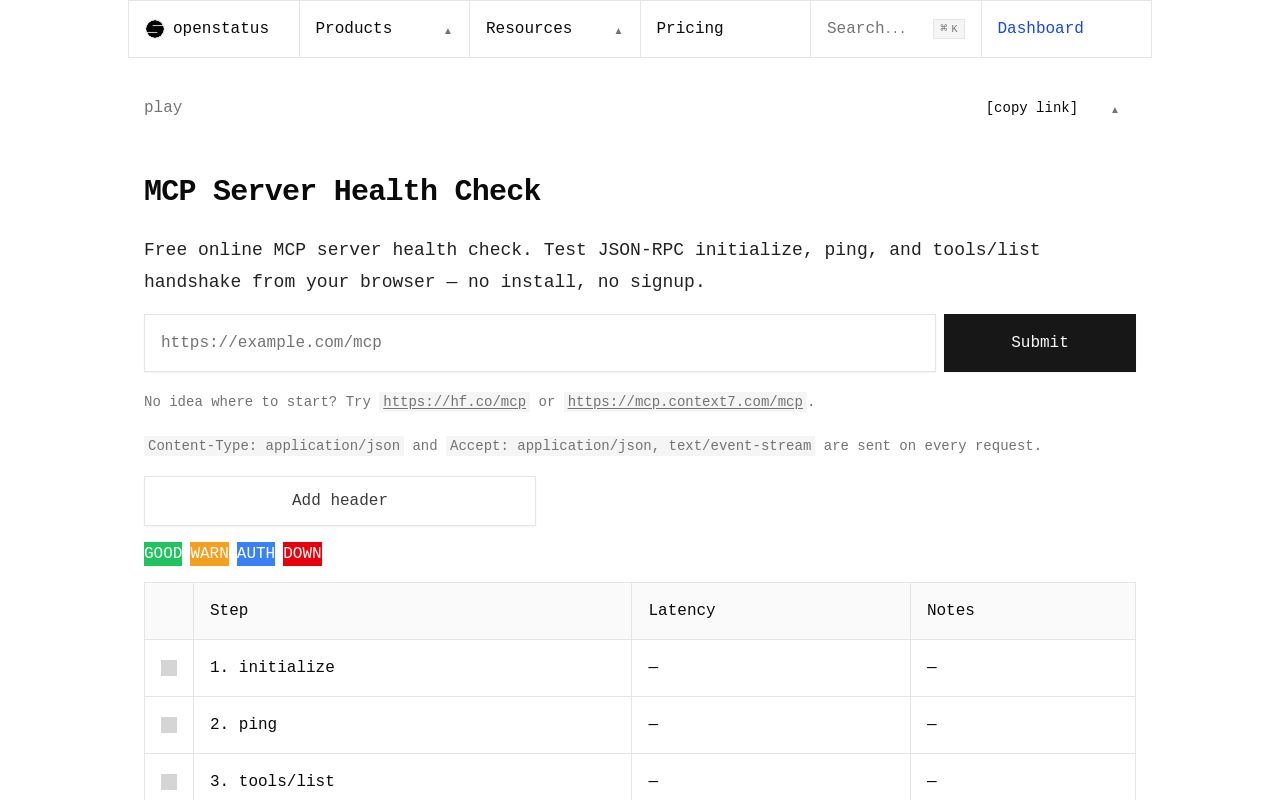
The Openstatus MCP Health Checker is an open-source CLI tool designed to test MCP (Machine Control Protocol) servers like a real AI client—not just through basic ping checks. Unlike traditional monitoring tools, it simulates actual AI client behavior, providing deeper insights into server health, latency, and compatibility. With a 220-vote reception on Product Hunt, it has gained traction among developers working with AI infrastructure.
This tool is ideal for engineers who need to verify MCP server readiness before deploying AI applications. Below, we explore its features, installation, use cases, and alternatives.
The Openstatus MCP Health Checker goes beyond basic connectivity tests by simulating real AI client interactions with MCP servers. Key functionalities include:
- Realistic AI Client Simulation – Unlike simpleping or curl checks, it mimics how an AI application would communicate with an MCP server, validating protocol compliance.
- Latency & Response Analysis – Measures response times under different payload conditions, helping identify bottlenecks.
- Error Detection – Flags protocol mismatches, unexpected server behavior, or malformed responses that could break AI integrations.
- Open-Source & Extensible – Available on GitHub, developers can modify or extend the tool for custom MCP validation needs.
Since MCP is used in AI orchestration, ensuring server reliability before deployment is critical. This tool fills that gap by providing real-world testing rather than superficial checks.
The Openstatus MCP Health Checker is available as a CLI tool, making it easy to integrate into development workflows. While exact installation commands aren’t publicly documented, the process typically involves:
Example usage might include:
``bash
mcp-health-checker --endpoint "your-mcp-server:port" --verbose
`
Key flags likely include:
-
--endpoint – Specifies the MCP server address.
- --timeout – Adjusts the maximum wait time for responses.
- --verbose – Enables detailed logging for debugging.
Since the tool is open-source, advanced users can modify the source code for custom validations.
---
## Use Cases
The **Openstatus MCP Health Checker** is valuable in scenarios where MCP server reliability directly impacts AI operations:
### **AI Deployment Testing**
Before rolling out AI applications, developers can verify that MCP servers handle requests correctly, reducing runtime failures.
### **CI/CD Pipeline Integration**
In automated deployment pipelines, the tool can **fail builds** if MCP servers don’t meet latency or protocol compliance thresholds.
### **Troubleshooting Production Issues**
If an AI application behaves unpredictably, this tool helps isolate whether the problem stems from the MCP server or the client code.
### **Load Testing & Benchmarking**
By simulating multiple AI clients, teams can assess how well their MCP infrastructure scales under increased demand.
Given its **open-source nature**, organizations can adapt it for proprietary MCP implementations.
---
## Evaluation Criteria
When assessing the **Openstatus MCP Health Checker**, consider these factors:
### **Accuracy of Simulation**
Does it truly replicate AI client behavior, or does it only perform superficial checks?
### **Ease of Integration**
Can it be embedded into existing DevOps workflows without major configuration overhead?
### **Performance Metrics**
Does it provide meaningful latency, error rate, and throughput data?
### **Community & Maintenance**
With an open-source tool, check GitHub activity (commits, issues, forks) to gauge long-term viability.
Given its **74 domain rating** and Product Hunt reception, the tool appears credible but may require self-hosting for enterprise use.
---
## Alternatives
While the **Openstatus MCP Health Checker** is specialized, other tools offer overlapping functionality:
| Tool | Key Difference | Best For |
|------|--------------|----------|
| **Postman** | API testing, not MCP-specific | General API debugging |
| **curl** | Low-level HTTP requests | Basic connectivity checks |
| **Custom Scripts** | Fully customizable | Teams needing tailored validations |
The **Openstatus tool stands out** for its **MCP-specific focus**, making it ideal for AI developers.
---
## FAQ
### **Is the Openstatus MCP Health Checker free?**
Yes, it’s **open-source** with no mentioned commercial pricing.
### **Does it support all MCP versions?**
Check the GitHub repository for protocol compatibility details.
### **Can I contribute to the project?**
As an open-source tool, external contributions are likely welcome.
### **Are outbound links from listings nofollow?**
Yes, automated directory listings typically use rel="nofollow"` for outbound links.
Ping only tests connectivity, while this tool validates full MCP protocol adherence.
The Openstatus MCP Health Checker is a developer-focused tool that fills a niche in AI infrastructure testing. By simulating real client behavior, it helps teams prevent MCP-related failures before they impact production.
For AI engineers relying on MCP servers, this tool offers a more robust alternative to generic health checks. Explore it on Openstatus.dev or GitHub.
Test MCP servers like a real AI client, not just a ping
No verified install command is listed yet. Use the official project link or repository for setup instructions.
Test MCP servers like a real AI client, not just a ping
No verified install command is listed yet. Use the official project link or repository for setup instructions.