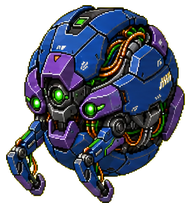
Droon
A serious blue-purple spherical drone companion with green optics, exposed cables, and compact mech animation.
mkdir -p ~/.codex/pets/droon-411b48f7 && curl -L -o /tmp/droon-411b48f7.zip https://file.aimcp.info/codex-pets/droon-411b48f7/droon-411b48f7.zip && unzip -o /tmp/droon-411b48f7.zip -d ~/.codex/pets/droon-411b48f7- 1Make sure the Codex CLI is installed and you are signed in.
- 2Copy the install command above and run it in your terminal:
mkdir -p ~/.codex/pets/droon-411b48f7 && curl -L -o /tmp/droon-411b48f7.zip https://file.aimcp.info/codex-pets/droon-411b48f7/droon-411b48f7.zip && unzip -o /tmp/droon-411b48f7.zip -d ~/.codex/pets/droon-411b48f7. It downloads the package into~/.codex/pets/. - 3Open
/petinside Codex and select Droon to bring it to life in your session.
A serious blue-purple spherical drone companion with green optics, exposed cables, and compact mech animation.
What is Droon?
Droon is a Codex pet, a small animated character you install into the Codex CLI. Once hatched it appears in your terminal as a companion while you code.
How do I install Droon?
Run `mkdir -p ~/.codex/pets/droon-411b48f7 && curl -L -o /tmp/droon-411b48f7.zip https://file.aimcp.info/codex-pets/droon-411b48f7/droon-411b48f7.zip && unzip -o /tmp/droon-411b48f7.zip -d ~/.codex/pets/droon-411b48f7` in your terminal to download the package into `~/.codex/pets/`, then open `/pet` inside Codex and select Droon to activate it.
Is Droon free to use?
Yes. Droon is free to install and is distributed under the unknown license.
What style is Droon?
Droon is tagged creature and codex-pets, which describes its look and animation theme.